
Troubleshooting React.js Runtime Errors Caused by the TrustWallet Extension
REACT JS DEBUGGING

Developing a React.js application can be a seamless experience, but sometimes, unexpected runtime errors can disrupt the flow. One such issue that developers may encounter involves runtime errors caused by browser extensions, particularly cryptocurrency wallet extensions like TrustWallet or MetaMask.
Understanding the Error
A common error encountered is:
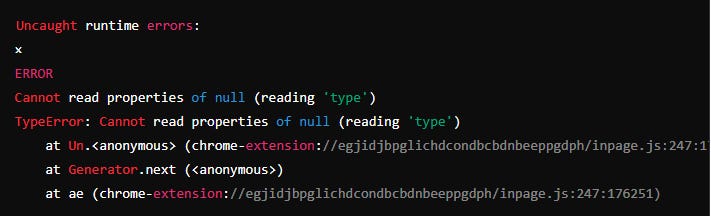
This error typically arises when the TrustWallet or MetaMask extension interacts with the React application, attempting to read or manipulate properties that are not available or are null.
Identifying the Cause
To understand why this error occurs, it's essential to recognize how browser extensions, particularly cryptocurrency wallet extensions, work. These extensions inject scripts into web pages to interact with them. However, these injected scripts can sometimes interfere with the normal operation of your React application, leading to runtime errors.
The error message indicates that the script is trying to read a property called `type` from a `null` object. This happens within the extension's `inpage.js` file, suggesting that the extension is trying to interact with a part of your application where it doesn't have the necessary context or data.
Steps to Reproduce
1. Install the TrustWallet or MetaMask extension on your Chrome browser.
2. Run your React.js application.
3. Observe if the runtime error occurs. If the error appears consistently when the extension is enabled but not when it is disabled, it confirms that the extension is the culprit.
Solutions and Workarounds
1. Disable the Extension: The simplest solution is to disable the TrustWallet or MetaMask extension while developing your React application. This can be done by navigating to the Chrome extensions page (`chrome://extensions/`) and toggling off the extension.
2. Detecting Extension Interference: In your React application, you can write code to detect if these extensions are present and handle their interference gracefully. For example, you can check if the `window.ethereum` object (in the case of MetaMask) or similar objects injected by TrustWallet are present and then take appropriate action.
javascript
if (typeof window.ethereum !== 'undefined' || typeof window.trustwallet !== 'undefined') {
console.log('Wallet extension detected');
// Handle accordingly
}
3. Isolate the Issue: Use a browser without any extensions or use incognito mode with extensions disabled to see if the error persists. This helps confirm that the extension is indeed causing the problem.
4. Modify Extension Settings: Some extensions allow you to configure their behavior on specific sites. Check the settings of TrustWallet or MetaMask to see if you can exclude your development environment from their operations.
5. Update Extensions: Ensure that you are using the latest version of the extension. Sometimes, such errors are fixed in newer versions.
6. Report the Issue: If you believe this is a bug, consider reporting it to the developers of the TrustWallet or MetaMask extension. Provide them with the details of the error and the steps to reproduce it.
Conclusion
While browser extensions like TrustWallet and MetaMask offer valuable functionalities, they can sometimes interfere with web applications, leading to runtime errors. By understanding the cause and applying the suggested solutions, you can minimize the impact of these errors and ensure a smoother development experience.
Remember, the key to handling such issues is to stay informed about the tools and technologies you are using and to keep your development environment as clean and controlled as possible. Happy coding!
---
Feel free to share your thoughts or experiences with runtime errors caused by browser extensions in the comments below. Let's learn and grow together as a community!
Yann Cedrick Kouekam